Service Fabric and Dependency Injection, part 1: Stateful Service

This is a series of blog posts:

The template of a Service Fabric application that is shipped with Visual Studio instantiates all services explicitly. Like and any other basic template, such as of ASP.NET infrastructure pipeline, it instantiates all filters and handlers right away as well.

But sooner or later you’ll likely have to pass to your service some dependencies, which have their own dependencies, and so on. This way you end up having a dependency tree. Natural answer to its growing complexity would be using a Dependency Injection (DI) container. I cannot recommend more Simple Injector for its performance and elegance of API.

Another reason to use a container would be the design principle which suggests that all constructor calls in your code (the new keyword in C-like languages) are the aspects of explicit lifetime (aka lifestyle) management scattered across your codebase. While actually it has to be performed by a container in one, centralized place called composition root.

ServiceRuntime.RegisterServiceAsync(nameof(MyStatefulService) + "Type", context => CreateService(context))
              .GetAwaiter()
              .GetResult();
 
private static StatefulServiceBase CreateService(StatefulServiceContext context)
{
    var container = ContainerConfig.CreateContainer(context);
    return container.GetInstance();
}

Now you only need to register the service (optionally) and the service context (mandatory):

internal static class ContainerConfig
{
    public static Container CreateContainer(StatefulServiceContext context)
    {
        var container = new Container();
        container.Options.DefaultScopedLifestyle = new AsyncScopedLifestyle();
 
        container.RegisterInstance<StatefulServiceContext>(context);
        container.RegisterInstance<ServiceContext>(context);
        container.RegisterSingleton<MyStatefulService>();
 
        return container;
    }
}

The caveat here is to map service context to two types, StatefulServiceContext and ServiceContext. Why? Because you’ll likely have both steteful and stateless services in your application, and their dependencies, such as configuration management, will likely depend on the base type ServiceContext. Meanwhile services require the concrete type in their respective constructors. The good thing is that the same instance would be resolved in both cases:

public sealed class MyStatefulService
{
    public MyStatefulService(StatefulServiceContext context, ...)
    {
    }
}
 
public sealed class ServiceFabricConfigurationManager : IConfigurationManager
{
    public ServiceFabricConfigurationManager(ServiceContext context, ...)
    {
    }
}

That’s it! Now your stateful service itself and all its dependencies are recursively instantiated and controlled by the container.

Posted in Programming | Tagged , | Leave a comment

How to deploy Service Fabric application using ARM template

You can deploy a Service Fabric application using an ARM templat with a number very different mechanisms, whichever you’d like:

But first you need the actual ARM template. Here’s an example of an application consisting of one stateless service (the frontend) and one stateful service (the backend):

{
  "$schema": "http://schema.management.azure.com/schemas/2019-04-01/deploymentTemplate.json#",
  "contentVersion": "1.0.0.0",
  "parameters": {
    "location": {
      "type": "string",
      "defaultValue": "[resourceGroup().location]",
      "metadata": {
        "description": "The Azure region where the cluster is located."
      }
    },
    "clusterName": {
      "type": "string",
      "metadata": {
        "description": "Name of your cluster - Between 3 and 23 characters. Letters and numbers only."
      }
    },
    "appPackageUrl": {
      "type": "string",
      "metadata": {
        "description": "The URL to the application package sfpkg file."
      }
    },
    "applicationName": {
      "type": "string",
      "defaultValue": "MyApplication",
      "metadata": {
        "description": "The application name."
      }
    },
    "applicationTypeName": {
      "type": "string",
      "defaultValue": "MyApplicationType",
      "metadata": {
        "description": "The application type name."
      }
    },
    "applicationTypeVersion": {
      "type": "string",
      "metadata": {
        "description": "The application type version."
      }
    },
    "applicationParameters": {
      "type": "object",
      "metadata": {
        "description": "Application parameters override to be applied when creating or upgrading an application."
      },
      "defaultValue": {
        "MyStatelessService_PlacementConstraints": "[parameters('MyStatelessService_PlacementConstraints')]",
        "MyStatelessService_InstanceCount": "[parameters('MyStatelessService_InstanceCount')]",

        "MyStatefulService_PlacementConstraints": "[parameters('MyStatefulService_PlacementConstraints')]",
        "MyStatefulService_TargetReplicaSetSize": "[parameters('MyStatefulService_TargetReplicaSetSize')]",
        "MyStatefulService_MinReplicaSetSize": "[parameters('MyStatefulService_MinReplicaSetSize')]",
        "MyStatefulService_PartitionCount": "[parameters('MyStatefulService_PartitionCount')]"
      }
    },
    "MyStatelessService_PlacementConstraints": {
      "type": "string"
    },
    "MyStatelessService_InstanceCount": {
      "type": "int",
      "defaultValue": -1
    },
    "MyStatefulService_PlacementConstraints": {
      "type": "string"
    },
    "MyStatefulService_TargetReplicaSetSize": {
      "type": "int"
    },
    "MyStatefulService_MinReplicaSetSize": {
      "type": "int"
    },
    "MyStatefulService_PartitionCount": {
      "type": "int"
    }
  },
  "variables": {
    "sfApiVersion": "2021-06-01"
  },
  "resources": [
    {
      "name": "[format('{0}/{1}', parameters('clusterName'), parameters('applicationTypeName'))]",
      "apiVersion": "[variables('sfApiVersion')]",
      "type": "Microsoft.ServiceFabric/clusters/applicationTypes",
      "location": "[parameters('location')]",
      "properties": {
      },
      "dependsOn": []
    },
    {
      "name": "[format('{0}/{1}/{2}', parameters('clusterName'), parameters('applicationTypeName'), parameters('applicationTypeVersion'))]",
      "apiVersion": "[variables('sfApiVersion')]",
      "type": "Microsoft.ServiceFabric/clusters/applicationTypes/versions",
      "location": "[parameters('location')]",
      "properties": {
        "appPackageUrl": "[parameters('appPackageUrl')]"
      },
      "dependsOn": [
        "[concat('Microsoft.ServiceFabric/clusters/', parameters('clusterName'), '/applicationTypes/', parameters('applicationTypeName'))]"
      ]
    },
    {
      "name": "[format('{0}/{1}', parameters('clusterName'), parameters('applicationName'))]",
      "apiVersion": "[variables('sfApiVersion')]",
      "type": "Microsoft.ServiceFabric/clusters/applications",
      "location": "[parameters('location')]",
      "properties": {
        "typeName": "[parameters('applicationTypeName')]",
        "typeVersion": "[parameters('applicationTypeVersion')]",
        "parameters": "[parameters('applicationParameters')]",
        "upgradePolicy": {
          "upgradeReplicaSetCheckTimeout": "01:00:00.0",
          "forceRestart": true,
          "rollingUpgradeMonitoringPolicy": {
            "healthCheckWaitDuration": "00:02:00.0",
            "healthCheckStableDuration": "00:05:00.0",
            "healthCheckRetryTimeout": "00:10:00.0",
            "upgradeTimeout": "01:00:00.0",
            "upgradeDomainTimeout": "00:20:00.0"
          },
          "applicationHealthPolicy": {
            "considerWarningAsError": false,
            "maxPercentUnhealthyDeployedApplications": 0,
            "defaultServiceTypeHealthPolicy": {
              "maxPercentUnhealthyServices": 0,
              "maxPercentUnhealthyPartitionsPerService": 0,
              "maxPercentUnhealthyReplicasPerPartition": 0
            }
          }
        }
      },
      "dependsOn": [
        "[concat('Microsoft.ServiceFabric/clusters/', parameters('clusterName'), '/applicationTypes/', parameters('applicationTypeName'), '/versions/', parameters('applicationTypeVersion'))]"
      ]
    },
    {
      "name": "[format('{0}/{1}/{1}~{2}', parameters('clusterName'), parameters('applicationName'), 'MyStatelessService')]",
      "apiVersion": "[variables('sfApiVersion')]",
      "type": "Microsoft.ServiceFabric/clusters/applications/services",
      "location": "[parameters('location')]",
      "properties": {
        "serviceKind": "Stateless",
        "correlationScheme": [],
        "serviceLoadMetrics": [],
        "servicePlacementPolicies": [],
        "serviceTypeName": "MyStatelessServiceType",
        "placementConstraints": "[parameters('MyStatelessService_PlacementConstraints')]",
        "instanceCount": "[parameters('MyStatelessService_InstanceCount')]",
        "partitionDescription": {
          "partitionScheme": "Singleton"
        }
      },
      "dependsOn": [
        "[concat('Microsoft.ServiceFabric/clusters/', parameters('clusterName'), '/applications/', parameters('applicationName'))]"
      ]
    },
    {
      "name": "[format('{0}/{1}/{1}~{2}', parameters('clusterName'), parameters('applicationName'), 'MyStatefulService')]",
      "apiVersion": "[variables('sfApiVersion')]",
      "type": "Microsoft.ServiceFabric/clusters/applications/services",
      "location": "[parameters('location')]",
      "properties": {
        "serviceKind": "Stateful",
        "serviceTypeName": "MyStatefulServiceType",
        "placementConstraints": "[parameters('MyStatefulService_PlacementConstraints')]",
        "hasPersistedState": true,
        "defaultMoveCost": "Zero",
        "replicaRestartWaitDuration": "00:01:00.0",
        "quorumLossWaitDuration": "00:02:00.0",
        "standByReplicaKeepDuration": "00:00:30.0",
        "targetReplicaSetSize": "[parameters('MyStatefulService_TargetReplicaSetSize')]",
        "minReplicaSetSize": "[parameters('MyStatefulService_MinReplicaSetSize')]",
        "partitionDescription": {
          "partitionScheme": "UniformInt64Range",
          "count": "[parameters('MyStatefulService_PartitionCount')]",
          "lowKey": "-9223372036854775808",
          "highKey": "9223372036854775807"
        }
      },
      "dependsOn": [
        "[concat('Microsoft.ServiceFabric/clusters/', parameters('clusterName'), '/applications/', parameters('applicationName'))]"
      ]
    }
  ]
}

Note that there is a number of different ways to get the latest API version for Service Fabric applications, such as:

Happy deployment!

Posted in Infrastructure | Tagged , | 21 Comments

How to package Service Fabric application into SFPKG using custom MSBuild task

This task wouldn’t require much efforts but:

Here’s the full project, I called it package.props and imported from all my sfproj:

<?xml version="1.0" encoding="utf-8"?>
<Project ToolsVersion="15.0" DefaultTargets="Build" xmlns="http://schemas.microsoft.com/developer/msbuild/2003">
  <Import Project="..\packages\RoslynCodeTaskFactory.2.0.7\build\RoslynCodeTaskFactory.props" />
  <UsingTask TaskName="Zip"
             TaskFactory="CodeTaskFactory"
             AssemblyFile="$(RoslynCodeTaskFactory)"
             Condition="'$(RoslynCodeTaskFactory)' != ''">
    <ParameterGroup>
      <SourceDirectoryName ParameterType="System.String" Required="true" />
      <DestinationArchiveFileName ParameterType="System.String" Required="true" />
    </ParameterGroup>
    <Task>
      <Reference Include="System.IO.Compression.FileSystem" />
      <Using Namespace="System.IO.Compression" />
      <Code Type="Fragment" Language="cs">
        <![CDATA[
try
{
  if (File.Exists(DestinationArchiveFileName))
  {
    Log.LogMessage("File {0} already exists, deleting.", DestinationArchiveFileName);
    File.Delete(DestinationArchiveFileName);
  }
  string directoryName = Path.GetDirectoryName(DestinationArchiveFileName);
  if (!Directory.Exists(directoryName))
  {
    Log.LogMessage("Directory {0} doesn't exist, creating..", directoryName);
    Directory.CreateDirectory(directoryName);
  }
  Log.LogMessage("Zipping directory {0} to {1}", SourceDirectoryName, DestinationArchiveFileName);
  ZipFile.CreateFromDirectory(SourceDirectoryName, DestinationArchiveFileName);
  return true;
}
catch (Exception ex)
{
  Log.LogErrorFromException(ex);
  return false;
}
]]>
      </Code>
    </Task>
  </UsingTask>
  <Target Name="Package" DependsOnTargets="$(PackageDependsOn)" AfterTargets="Build" Returns="@(_AllPackageFiles)" />
  <Target Name="ZipPackage" AfterTargets="Package">
    <PropertyGroup>
      <PackageSource>pkg\$(Configuration)</PackageSource>
      <PackageDestination>sfpkg\$(MSBuildProjectName).sfpkg</PackageDestination>
    </PropertyGroup>
    <Zip SourceDirectoryName="$(PackageSource)" DestinationArchiveFileName="$(PackageDestination)" />
  </Target>
</Project>

It will zip folder pkg\Release to sfpkg\.sfpkg.

Now call the Package target using PowerShell:

param
(
  [Parameter(Mandatory=$true)]
  [ValidateSet('Debug', 'Release')]
  [string]$Configuration
)
 
$projects = Get-ChildItem *.sfproj -Recurse
foreach ($project in $projects)
{
  Write-Host "Packaging project $project and configuration $Configuration"
  & msbuild "$project" /t:Package /p:Platform=x64 /p:Configuration=$Configuration /m
}

That’s it. Now you can take the resulting sfpkg and deploy it directly to your Service Fabric cluster.

Posted in Infrastructure | Tagged , , | 1 Comment

How to remove ARM resources for Service Fabric application and service using PowerShell

First you need to remove the resource corresponding to the application itself:

Remove-AzureRmResource
-ResourceId /subscriptions/$subscriptionId/resourcegroups/$resourceGroupName/providers/Microsoft.ServiceFabric/clusters/$clusterName/applications/$applicationName
-ApiVersion "2017-07-01-preview"
-Force
-Verbose

And then the resource corresponding to the service:

Remove-AzureRmResource
-ResourceId /subscriptions/$subscriptionId/resourcegroups/$resourceGroupName/providers/Microsoft.ServiceFabric/clusters/$clusterName/applicationTypes/$serviceTypeName/versions/$serviceTypeVersion
-ApiVersion "2017-07-01-preview"
-Force
-Verbose

Posted in Programming | Tagged , , | Leave a comment

How to call LINQ extension methods such as Where and ToDictionary using PowerShell

If you have IEnumerable<XElement> and want to call various LINQ extension methods such as Enumerable.Where() or ​​Enumerable.ToDictionary() on it using PowerShell then first load the necessary assemblies:


[void][System.Reflection.Assembly]::LoadWithPartialName('System.Core')
[void][System.Reflection.Assembly]::LoadWithPartialName("System.Xml.Linq")

And here’s the code for Where():


$whereCond = [System.Func``2[System.Xml.Linq.XElement, bool]] { $args[0].Attribute("Name").Value.Contains('_') -eq $false };
$elems = [System.Linq.Enumerable]::ToDictionary($elems, $whereCond)

and for ToDctionary():

$keySelector = [System.Func``2[System.Xml.Linq.XElement, string]] { $args[0].Attribute("Name").Value }
$elementSelector = [System.Func``2[System.Xml.Linq.XElement, string]] { $args[0].Attribute("Value").Value }
$dic = [System.Linq.Enumerable]::ToDictionary($elems, $keySelector, $elementSelector)
Posted in Programming | Tagged , | Leave a comment

The BuildLayout of the application is invalid. Code is missing for service

If you’re getting these very rare but still mysterious errors:

Started executing script ‘Deploy-FabricApplication.ps1’. Test-ServiceFabricApplicationPackage : The BuildLayout of the application in
c:\Temp\TestApplicationPackage_3811564851592\icw0q1rk.bus\Release is invalid. Code is missing for service MyWebApiPkg.

or

Register-ServiceFabricApplicationType : The BuildLayout of the application in
C:\SfDevCluster\Data\ImageBuilderProxy\AppType\a9f07f16-1fda-4319-a5e6-829f38a8f093 is invalid. Code is missing for service MyWebApiPkg.

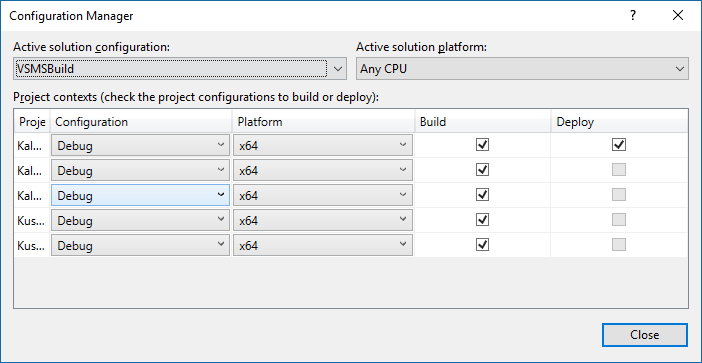
when trying to debug a Service Fabric application locally or just packaging it then make sure Build Configuration Manager settings match:

service-fabric_build-configuration-manager

Any discrepancy in Platform or Build would cause the said errors.

Posted in Programming | Tagged , | Leave a comment

How to reuse lambda parameter across multiple combined expressions

If you’re having multiple separately defined expressions having common lambda parameter like these:


Expression<Func> pre1 = u => u.FirstName != null;
Expression<Func> pre2 = u => u.MiddleName != null;
Expression<Func> pre3 = u => u.LastName != null;

And trying to combine them into one and to reuse the said parameter like this:

ParameterExpression param = Expression.Parameter(typeof(User), "u");
 
var predicates = GetPredicates();
var body = predicates.Select(exp => exp.Body)
                     .Aggregate((left, right) => Expression.AndAlso(left, right));
Expression<Func> lambda = Expression.Lambda<Func>(body, param);
Func func = lambda.Compile();

Then you’ll likely get an exception:

Unhandled Exception: System.InvalidOperationException: variable ‘u’ of type ‘User’ referenced from scope ”, but it is not defined.

The reason is that spite the lambda parameters have same type and name they’re defined in different expressions thus in different scopes so can’t be simply reused.

What you need to do is to use single parameter across all expressions, in other words to unify/merge/replace their parameters with one:

class ParameterReplacer : ExpressionVisitor
{
  private readonly ParameterExpression _param;
 
  private ParameterReplacer(ParameterExpression param)
  {
    _param = param;
  }
 
  protected override Expression VisitParameter(ParameterExpression node)
  {
    return node.Type == _param.Type ? // if types match on both of ends
      base.VisitParameter(_param) : // replace
      node; // ignore
  }
 
  public static T Replace(ParameterExpression param, T exp) where T : Expression
  {
    return (T)new ParameterReplacer(param).Visit(exp);
  }
}

And then:

var body = predicates.Select(exp => exp.Body)
                     .Select(exp => ParameterReplacer.Replace(param, exp))
                     .Aggregate((left, right) => Expression.AndAlso(left, right));
 
var lambda = Expression.Lambda<Func>(body, param);

That’s it, now compilation will work fine and produce the desired predicate.

Happy expression trees building!

Posted in Programming | Tagged | 2 Comments

Durable queue in Azure Service Fabric using WebJobs, Part 2: Web API

This is the second post in a series about Durable queue in Azure Service Fabric using WebJobs:

Now let’s create another stateless service that will host the Web API. I used default Visual Studio template called “Stateless ASP.NET Core”. You can find how it configures Kestrel as an underlying application web server here.

This service/Web API will have a controller responsible to convert requests into queue messages and enqueue them. For the sake of demonstration, this would be an incidents management system (IcM):

  • Read requests go through cache. High volume can be handled. Cache is populated from storage during cold start.
  • Write requests go though cache as well and update it, then update storage. Implemented using HTTP verb PATCH to better support concurrency.
namespace DurableQueueSample.StatelessWebApiService.Controllers
{
  public sealed class IncidentController : Controller
  {
    public async Task Get(Guid incidentId)
    {
      var actorId = new ActorId($"GET+{incidentId}", Uri("fabric:/DurableQueueSampleApplication/ActorStatefulService");
      var actor = ActorProxy.Create(actorId);
 
      var incident = await actor.GetIncident(incidentId);
      return Ok(incident);
    }
 
    public async Task Patch(Guid incidentId, string name, string value)
    {
      var patchId = Guid.NewGuid();
      var patch = new IncidentPatch(patchId, incidentId, name, value);
 
      var messageContent = _jsonConverter.Convert(patch);
      await queueClient.EnqueueClient(queueName, messageContent);
 
      var url = _urlBuilder.BuildUrl(StatusController.GetStatusRouteName, new { patchId })!
      return Accepted(url);
    }
  }
}

Note that ASP.NET Web API doesn’t have a built-in method to return 202 Accepted so you would need to write yours own extension method, However ASP.NET Core does have a collection of them. We would need the one which accepts Uri without object.

Method Get() routes the request directly to the stateful service that hosts the actors that process the requests. While method Patch() enqueues the request, doesn’t wait for its processing to be completed, returns the control immediately after Azure Queue client acknowledges message reception. This way client browser also doesn’t wait, can check the status by following the provided url, i.e. /status/?patchId={patchId}. However, other clients, if try to retrieve the incident before the patch has been applied, might see outdated information. This the price for update requests asynchronous processing.

Here’s how the queue trigger function looks like:

namespace DurableQueueSample.StatelessWebJobsService.Functions
{
  public sealed class IncidentPatchFunction
  {
    [Singleton("{IncidentId}")]
    public async Task Handle(
      [QueueTrigger(queueName)] IncidentPatch patch,
      TextWriter dashboardLogger)
    {
      var actorId = new ActorId($"PATCH+{patch.IncidentId}", Uri("fabric:/DurableQueueSampleApplication/ActorStatefulService");
      var actor = ActorProxy.Create(actorId);
      await actor.UpdsteIncident(patch.IncidentId, patch.PropertyName, patch.PropertyValur);
    }
  }
}

Next time: we’ll create another, reliable actor service which will host the actors that handle operations on the incidents.

Posted in Programming | Tagged , | Leave a comment

Durable queue in Azure Service Fabric using WebJobs, Part 1: Introduction to Asynchronous Operations

This the first post in a series about Durable queue in Azure Service Fabric using WebJobs:

  • Part 1: Introduction to Asynchronous Operations
  • Part 2: Web API

The built-in into Azure Service Fabric (shortly ASF, or just SF) actor model and its queuing/dispatching mechanism has one, besides other if any, serious disadvantage: if an actor is created to process each incoming HTTP request (for given id), since actors by design are single-threaded, then all subsequent requests won’t be processed until the actor is done with the first one. Then again only one request is picked-up for processing, all other are basically waiting in a simple in-memory queue. And so on. What is unacceptable under heavy load because all incoming HTTP requests are blocked and waiting so are the users in browsers behind them.

Before switching to ASF, I was successfully using Azure Web Apps with WebJobs in the back to off-load heavy on computing HTTP requests which would be otherwise dropped by timeout. The workflow works as follows:

  • Web API accepts HTTP request, converts it into queue message payload, enqueues this message into Azure Queue, returns status code 202 Accepted which means that the request was not processed yet but rather considered for future processing. According to RFC 7231 – HTTP/1.1 Semantics and Content, RESTful Cookbook, or Microsoft docs for HDInsight, response should also include the Location header which client can follow to check the status of the operation.
  • WebJobs host polls the queue over configurable period of time and notifies a so called queue trigger which from the SDK consumer perspective looks like an asynchronous method invocation. One of the advtages is that the message payload can be read as either a string or a custom strongly-typed model class.
  • If trigger succeeded (didn’t throw exception) then message is considered processed and disappears from the queue.
  • Otherwise trigger is invoked again. If unsuccessful invocation threshold has been reached then message becomes poison and is put into a separate, so called poison message queue which can be monitored as any other, regular queue.

To enable the same workflow on the cluster, start the WebJobs host within a stateless service:

namespace DurableQueueSample.StatelessWebJobsService
{
  internal sealed class StatelessWebJobsService : StatelessService
  {
    public StatelessWebJobsService(StatelessServiceContext context)
      : base(context)
    {
    }
 
    protected override async Task RunAsync(CancellationToken cancellationToken)
    {
      try
      {
        var config = new JobHostConfiguration
        {
          DashboardConnectionString = connectionString,
          StorageConnectionString = connectionString,
          Queues =
          {
            BatchSize = 5,
            MaxDequeueCoun = 3,
            MaxPollingInterval = TimeSpan.FromSeconds(30)
          }
        };
        var host = new JobHost(config);
        await host.StartAsync(cancellationToken);
      }
      catch (Exception ex)
      {
        ServiceEventSource.Current.ServiceStartupFailedEvent(ex.ToString());
        throw;
      }
    }
  }
}

I omitted host configuration for brevity, you can find more in its source code, luckily it’s fully open sourced. I usually set the following properties instantiated by a Dependency Injection (DI) container such as Simple Injector:

  • DashboardConnectionString
  • StorageConnectionString
  • JobActivator
  • NameResolver
  • TypeLocator

Next time: we’ll create another stateless service that will host the Web API.

Posted in Programming | Tagged , | Leave a comment

Documentation as a Feature, Documentation is a Feature

TL;DR: documentation should be treated, i.e. planned, estimated and maintained, as any other functional part of a project.

I don’t always write documentation but when I do, I believe it’s more important it to be up-to-date than to exist. That it, it’s better to do not have any documentation than to have an out-of-date one. Because outdated documentation is misleading, misinforms your clients, might do more harm than good.

Posted in Programming | Tagged , | Leave a comment
